Using Obsidian Securely in the AI Era
Open claude_desktop_config.json on a typical 2026 knowledge-worker laptop and you’ll find something interesting: an MCP filesystem server, scoped to a directory. Maybe ~/Documents. Maybe ~/vault. Maybe — and this is the one worth thinking about — pointed straight at an Obsidian vault.
There are at least four open-source MCP servers built specifically to expose an Obsidian vault to Claude or ChatGPT or Cursor. People install them on purpose. The pitch is good: “ask Claude about anything I’ve ever written.” The implementation is also good: a few JSON lines, a restart, and your LLM can read every plaintext markdown file you own.
That’s the new shape of the problem. Your notes used to be a folder of text files. Now they’re also a search corpus for one or more language models, and most of them route content off-machine on demand.
We built Halfday Rune because the gap between “Obsidian is private” and “Obsidian, in 2026, on a machine with three AI tools running” turns out to be larger than people realize. This post is the case for caring, and what we did about it.
what’s actually in your vault
Forget specifics for a second. Picture the contents of a vault that’s been alive for two or three years. There’s:
- A few hundred journal entries — not curated for an audience.
- Half-baked side-project ideas, including the ones that never shipped because they were embarrassing.
- Notes from books, with your real opinions on the author.
- Contact details. Phone numbers. Birthdays.
- Financial notes you’d never paste into a chat window.
- Health information you wouldn’t email.
- Half-written letters.
- The folder called
inbox/with everything you haven’t decided whether to keep.
None of this is “secret” in the classified-document sense. All of it is material you didn’t write expecting it to be read by a language model that might log the request, route it through a third-party API, or surface a stray paragraph in someone else’s chat session three months later. That’s the threat. Not “the NSA wants my notes.” Just the standard knowledge-worker reality that you wrote freely because you were writing to yourself, and the audience just expanded without your consent.
the inventory — what can read your vault right now
Here’s the uncomfortable part. On a typical Mac with a normal-for-2026 toolkit, the list of background services that can read every markdown file in your vault looks like this:
- Claude Desktop with an MCP filesystem server. The official MCP filesystem server grants Claude read/write to any directory you allowlist. Point it at your vault once and that grant persists. There are several MCP servers built specifically for Obsidian vaults. They don’t even need Obsidian to be running — they read the markdown directly.
- ChatGPT desktop on macOS with Work with Apps, which uses the macOS Accessibility API to read content from a fixed app list, plus any MCP server you’ve wired up.
- Cursor, if you’ve ever opened your vault as a workspace. Per Cursor’s own security page: “When you choose to index your codebase, Cursor uploads your codebase in small chunks to its servers to compute embeddings… plaintext code for computing embeddings ceases to exist after the life of the request.” The embeddings themselves persist in a Cursor-hosted vector DB. Privacy Mode flips retention to zero, but telemetry — “prompts, editor actions, code snippets, and edits” — is on by default.
- GitHub Copilot in VS Code, if you’ve ever opened your vault folder there. Copilot builds a local semantic index of any workspace and ships relevant snippets to GitHub on autocomplete.
- Spotlight + Apple Intelligence indexing your notes content locally and feeding the “personalized” answer surface.
- Your cloud sync provider’s AI features. Which brings us to the canonical example.
That’s four to seven services, depending on how your machine is set up. Each individual policy is reasonable in isolation. The cumulative surface area is the thing that changed.
the dropbox-openai precedent
If you want one incident to anchor the threat model, this is it.
In December 2023, Dropbox launched Dropbox Dash with OpenAI as the LLM provider. The AI-features toggle shipped on by default for users outside the EU/UK/Canada. There was no notification. CEO Drew Houston denied data was leaving without prompts; Dropbox’s official statement said “only content relevant to explicit requests or commands is sent to third-party AI partners… data is never employed for training internal models and is promptly deleted from OpenAI’s servers within 30 days.”
Read carefully. The denial was about training. The default-on toggle was about retrieval. Millions of accounts had their setting flipped without notice, and most users found out from a CNBC explainer on how to turn it off.
The pattern is the load-bearing part. Not “Dropbox was evil.” Not “OpenAI trained on your files.” The pattern is: a sync provider you trusted in 2018 quietly bolted an LLM pipeline onto your files in 2023 and made you find out by reading a setting page. Microsoft started rolling Copilot agents into OneDrive earlier this year with “no special admin setup” required. The default-on pattern doesn’t go away. It generalizes.
And if you’ve ever pasted a sensitive bit of writing into ChatGPT and wondered which other surfaces have similar reach — Microsoft Recall has been caught capturing passwords and SSNs on Windows 11 despite the “filter sensitive information” feature shipping by default. Signal blocked Recall via DRM in May 2025 because, per Signal’s own statement, “Microsoft has simply given us no other option.”
None of this is conspiracy. It’s product launch notes, support docs, and security advisories. The frame for an Obsidian user in 2026 is just: a lot of well-intentioned services are now in a position to read your vault, and the policies that govern them can change in a quarter.
what obsidian fixes and what it doesn’t
Obsidian Sync is end-to-end encrypted. The help docs are unambiguous: “your notes are encrypted on your device and can only be decrypted on your device — never on the server.” They publish a guide for verifying the claim. Obsidian Sync is good. It’s not the gap.
But — and this is the gap — Obsidian doesn’t encrypt your local vault on your device. The files in your vault directory are plain markdown. Sync’s E2E story ends at the network boundary. Every threat in the inventory above operates on the disk side of that boundary.
This isn’t a hidden flaw. It’s a deliberate design decision. Obsidian’s CEO has publicly favored the “use Sync, encrypt with external tools” position. The forum thread “Password protect / lock folder / Encryption at rest” has been open since June 2020, with hundreds of replies and multiple pages of users asking the platform to ship at-rest encryption. The platform hasn’t. It probably won’t. That’s why third-party encryption plugins exist.
Several already do. We took a look at all of them before building another one.
the existing options
There are four plugins that solve some part of this problem. We’ll cover them honestly because we don’t think this is a winner-take-all category.
- Meld Encrypt is the incumbent. AES-GCM with a password-derived key. Whole-note or selection-based encryption. Mature, widely installed, the de-facto answer when people ask “how do I encrypt an Obsidian note.” Its model is the password-vault model: one passphrase, one note, one shared secret. There’s no public independent audit; the docs say so directly.
- Age Encrypt by Mr-1311 uses the age format, which is great. It’s passphrase-based per the public docs, and it’s selection-based by default — encrypted regions become fenced code blocks you click to decrypt. It was merged into the catalog in February 2025. This is the closest direct competitor in spirit.
- gpgCrypt uses real OpenPGP, including hardware-key support via YubiKey or Nitrokey when you have a working
gpg-agent. If you already live in GPG-land, this is excellent. The trade-off is the GPG-land prerequisite. - Cryptsidian is a vault-freezer: encrypt the whole vault as a single operation, decrypt to use it. Different problem entirely; useful for cold storage, not for working notes.
Rune’s wedge against this set is a specific combination: age + multi-recipient + live-preview rendering + key rotation, all four. No competitor has all four.
| Meld | Age Encrypt | gpgCrypt | Cryptsidian | Rune | |
|---|---|---|---|---|---|
| Crypto | AES-GCM (custom) | age (passphrase) | OpenPGP | AES-CTR (custom) | age (X25519 recipients) |
| Multi-recipient | — | — | (PGP keypair) | — | yes |
| Live preview while encrypted at rest | partial | — (fenced blocks) | yes | n/a | yes |
| Built-in key rotation | — | — | manual | — | yes |
(None of these plugins, Rune included, has had a formal third-party audit.)
Different threat models, different audiences. If you want a password-locked note with a colleague, Meld is the right tool. If you want to encrypt a snippet inside an otherwise-public note, Age Encrypt or Meld’s in-place mode. If you live in GPG and need hardware keys today, gpgCrypt. If you want a vault that’s encrypted at rest, opens like a normal note, encrypts to a backup recipient by default, and lets you rotate keys without exporting everything to plaintext first — that’s what we built.
what halfday rune does
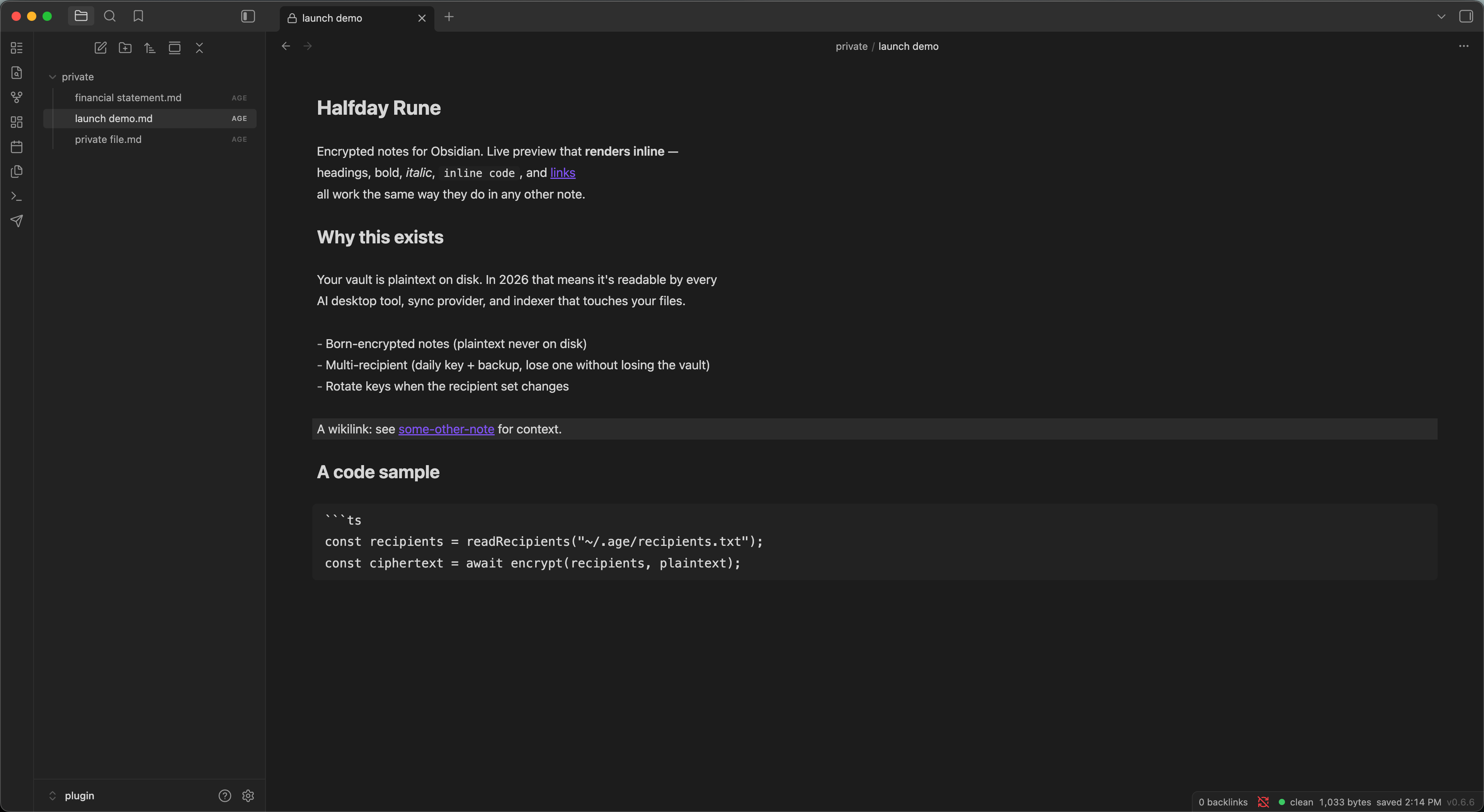
Rune is an Obsidian plugin that adds a single new file type — .age — and a custom view that decrypts it in memory while you edit.
- Born-encrypted notes.
Halfday Rune: New private notecreates a.agefile directly. Plaintext never touches disk. Not in a temp file, not in a swap file, not in a recovery file. - Live-preview markdown. Headings, bold, italic, inline code, links, wikilinks, fenced code blocks, lists — all render the same way they do in a normal Obsidian note. Encryption isn’t a separate mode you toggle into; it’s where the file already lives.
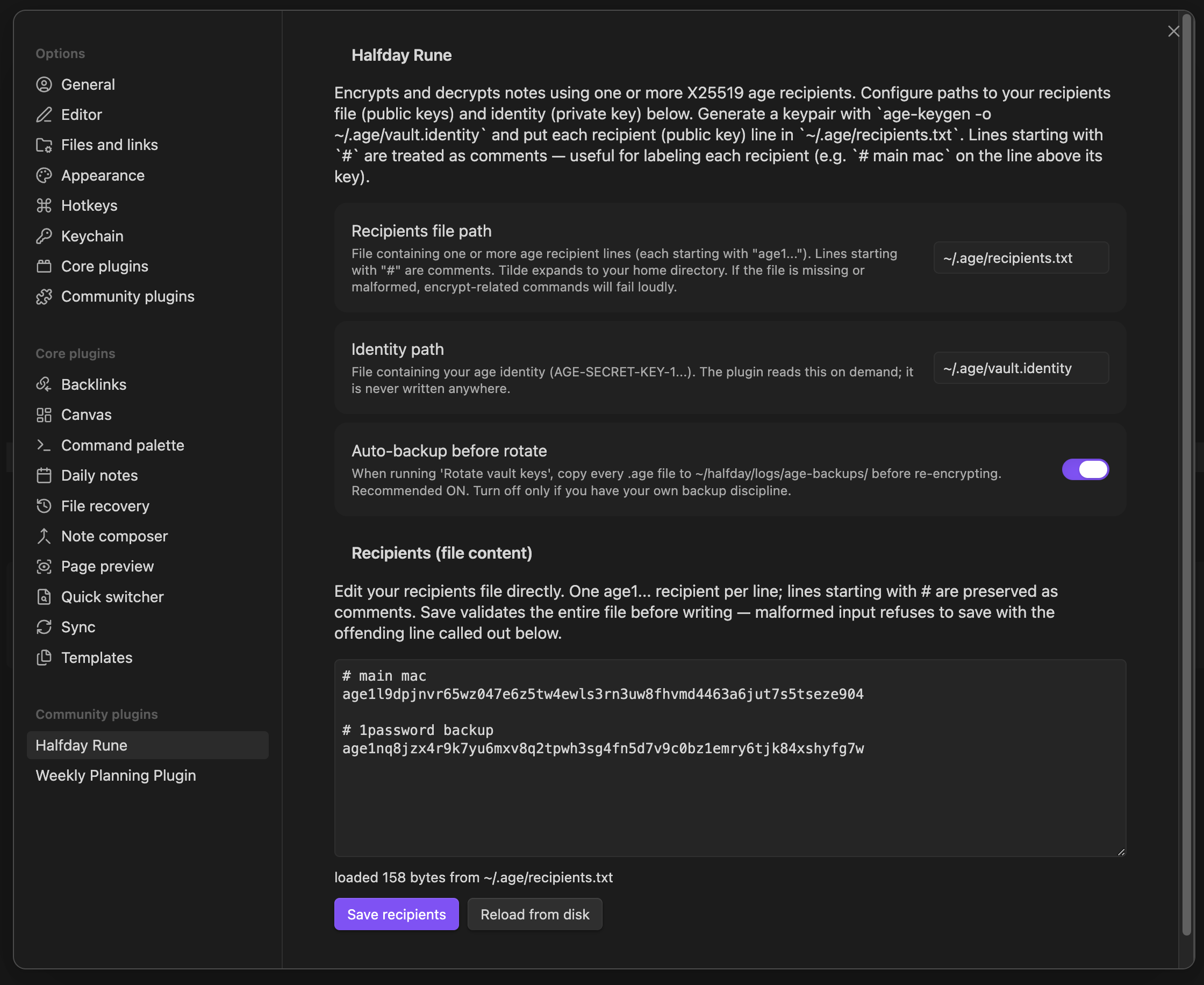
- Multi-recipient encryption. Add a backup recipient — say, an offline key on a YubiKey or a key you keep on a thumb drive — and every new note encrypts to both. Lose your daily-driver identity, decrypt with the backup.
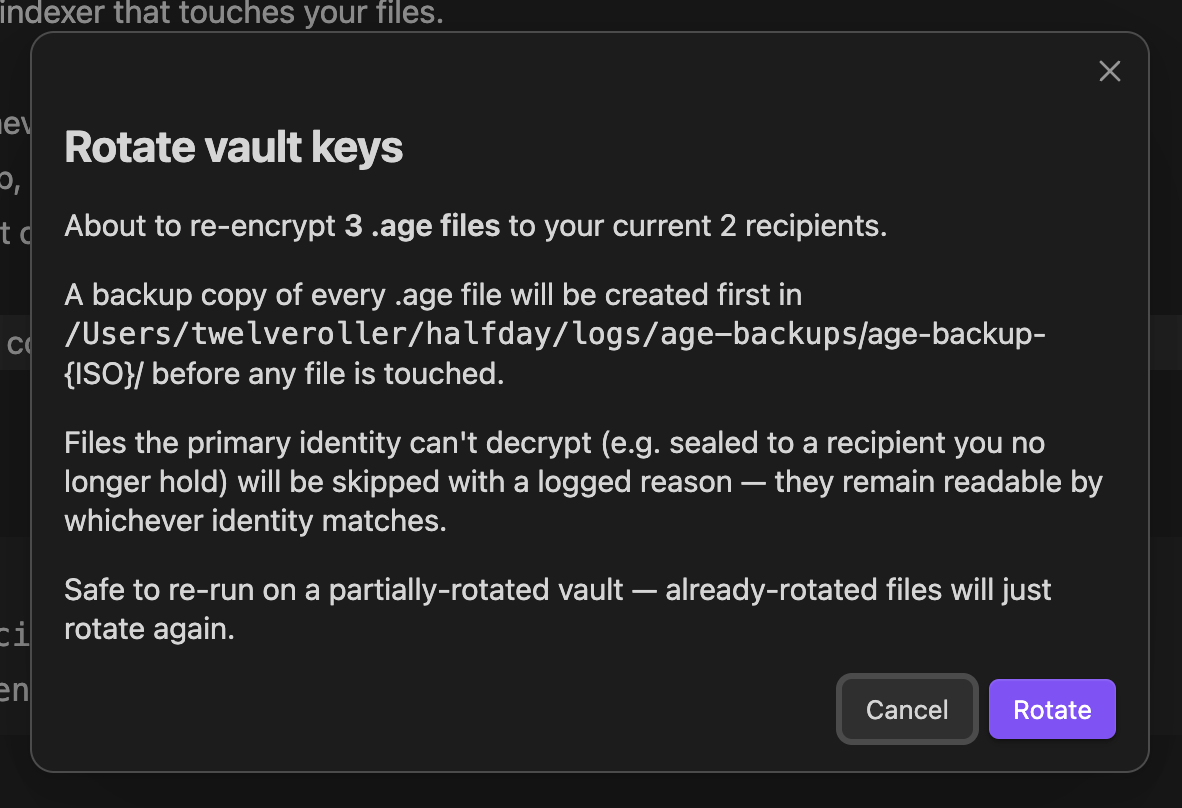
- Rotate vault keys. Add a recipient or revoke one, then run
Halfday Rune: Rotate vault keysand every.agefile in the vault gets re-encrypted to the current recipients list. Round-trip-verified per file. Optional backup copy of every.agefile before the rotation runs. - Decrypt back to markdown. Want a plaintext copy for a one-off export?
Halfday Rune: Decrypt current .age → .mdwrites the.mdand (optionally) deletes the.ageafter a round-trip verify.
The trust statement we wrote into the threat model and we’re not going to fudge: plaintext exists only in editor JavaScript memory while a note is open. Close the tab and it’s gone. No swap file, no recovery file, no temp file. The on-disk file is always the .age ciphertext.
Under the hood: Rune wraps typage, the TypeScript port of age by Filippo Valsorda (Go cryptography lead, ex-Cloudflare). The on-disk format is byte-compatible with the standard age CLI — age -d -i ~/.age/vault.identity note.md.age works from the command line, no plugin required. We don’t roll our own crypto; we wrap a published, peer-reviewed standard.
what we won’t claim
A few features are real and shipping; a few are not. We’d rather list them than have you find out the hard way.
Shipping today (v0.6.3):
- Born-encrypted, multi-recipient, live-preview, rotate, decrypt-back.
- Sanitization: raw HTML rendered as literal text,
javascript:anddata:link schemes get no link affordance, remote and local images are deferred to placeholder chips (no HTTP request fires when you open a note),![[embed]]transclusion is inert. - ~95 unit tests. Apache 2.0. Threat model published in the repo.
Coming:
- Click-to-navigate on links and wikilinks (Phase 2 — the v0.6.3 sanitization pass deliberately suppresses click handlers until we can land them safely).
- Syntax highlighting inside fenced code blocks (Phase 2 — current behavior is plain monospace).
- Mobile support (not yet — typage’s WASM stack on iOS Obsidian still has rough edges).
- Hardware-key support via Secure Enclave or YubiKey (planned via
age-plugin-se; not in v0.6.3).
If any of those are blockers for you, one of the four competitors above is probably the right tool today.
why we’re comfortable putting this out
A few things make us willing to ship a security plugin in public.
- It’s open source. Apache 2.0, full source at github.com/halfday-dev/halfday-rune. Read it. Audit it. Fork it.
- The threat model is published. Right in the README. Including what it doesn’t protect (memory dumps, malicious extensions in the same Electron process, your identity file at rest, side-channel inference from filenames). We’d rather be honest about the limits than have someone learn them in production.
- The crypto isn’t ours. age is the work of Filippo Valsorda and @benjojo; typage is Filippo’s TypeScript port. We’re a thin shell on top.
- Sanitization is paranoid. No DOM injection, no auto-image-load, no transclusion routing, no link affordance for
javascript:ordata:schemes. If you’ve used a markdown viewer that happily fetched a tracking pixel from a note someone sent you, you’ll appreciate the difference.
This isn’t a finished product. It’s an early release of a tool that solves a specific problem we cared about enough to build. It’s live in Obsidian’s community plugin catalog — one-click install from “Browse community plugins,” or a manual install if you prefer.
try it
The easy way: in Obsidian, open Settings → Community plugins → Browse, search “Halfday Rune,” click Install, then Enable.
Or install manually:
- Grab
manifest.json,main.js, andstyles.cssfrom the latest release on GitHub. - Drop them into
<your-vault>/.obsidian/plugins/halfday-rune/. - Enable in Settings → Community plugins.
Either way, finish by generating a key (age-keygen -o ~/.age/vault.identity), extracting the public recipient line into ~/.age/recipients.txt, and you’re set.
Full setup walkthrough in the README. It takes about three minutes if you’ve never used age before, less if you have.
If you want to support the work, buy us a coffee. The plugin is and will stay open source. It’s the “thank you for the work” path; it doesn’t unlock features and never will. Security OSS only works if trust is the currency, and gating features behind payment is the fastest way to spend it.
follow the build
We’re publishing the build story too — the five-releases-in-two-days dispatch loop, the parallel-subagent code review pattern, the specific bugs the agents caught (and the one they shipped). That’s the companion post: Building Halfday Rune With AI. It’s the methodology side of the same coin.
If you found this useful and want the next thing we ship:
- github.com/halfday-dev/halfday-rune — star it, file issues, send PRs.
- hello@halfday.dev — security disclosures, feedback, weird edge cases you hit.
- Buy me a coffee — keep the work going.
We build in half a day. You benefit for a lot longer.
Have an Obsidian vault you’d rather not have appear in an LLM context window? Try Rune. If you find a bug in the encryption flow, the threat model, or the sanitization pass, we want to know — privately, please. SECURITY.md has the disclosure process.